


Create Multiple Accounts in Your Tangem Wallet
This article is available in the following languages:
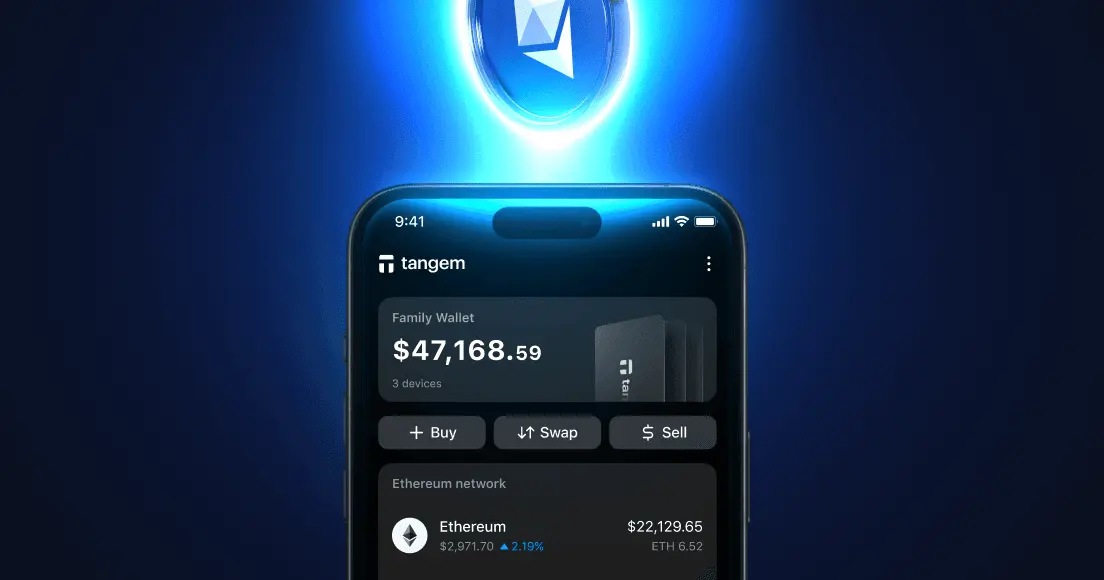
If you've ever wished for a simpler way to organize your crypto, we're thrilled to let you know we’ve made it possible. The new Multi-Accounts feature allows you to set up to 20 separate accounts all within one Tangem wallet. Let's explore how this can make your crypto journey even better.
What is Multi-Accounts?
Multi-Accounts lets you split your Tangem wallet into multiple independent accounts. Each account functions independently: it has its own public addresses across supported networks, maintains its own transaction history, and displays its own balance. Yet all accounts remain unified under your single wallet and backup system, meaning you don't need to manage multiple recovery systems.
How can I create a new account?
If you're an existing Tangem user, Multi-Accounts becomes available through an app update. New users will find the feature ready to go from their first setup.
To create a new account, follow the steps:
- Open your wallet and tap the three dots in the top-right corner
- Select the wallet from the list
- Tap Add account, then enter an account name and choose a color and icon.
- Accounts can be reordered in Wallet Settings via drag-and-drop.
On the main screen, you can easily collapse or expand accounts to simplify navigation, and it displays an overall balance for all your accounts, giving you a clear, helpful overview.
Smart account management
With a 20-account limit, you need an account lifecycle management system. The archive system delivers exactly that. When you archive an account, several things happen (and don't happen):
What's preserved:
- All balances remain intact
- All addresses stay valid
- Complete transaction history
- Any custom tokens associated with the account
What changes:
- The account is hidden from your main screen
- Its balance is excluded from your aggregated total
- The active account slot is freed up
This is critical: archiving doesn't delete anything. If you have funds in an archived account, they're still there, still secure, still yours. You're simply tucking the account away to reduce visual clutter and free up one of your 20 active slots.
How do I archive an account?
To archive an account, follow the steps:
- Open your wallet and tap the three dots in the top-right corner
- Select the wallet from the list
- Select the account and then tap Archive account.
Important: The account is not deleted. All balances, addresses, tokens, and transaction history are preserved, even if the account still contains funds. The archived account is hidden from the main screen. Archived accounts are excluded from the total balance calculation. It can be restored at any time. The Main account cannot be archived.
How do I restore an archived account?
To restore an archived account
- Open your wallet, tap the three dots in the top-right corner
- Select the wallet from the list
- Tap Archived accounts, then tap Recover next to the account you want to restore.
Important: You cannot restore an archived account if you already have 20 active accounts. To restore an account, please archive another unused account first to free up an active slot.
Recovery and compatibility
Because Tangem follows BIP-32/39/44/84 standards, your accounts are fully recoverable on any compatible wallet software. If you've set up your Tangem with a seed phrase and need to access your funds through a different wallet, you can import that seed phrase and navigate to the same derivation paths.
This is a critical feature for true self-custody: your funds are not locked to Tangem's proprietary system. The cryptographic standards ensure your assets remain accessible regardless of what happens to any single company or product.
Full feature parity across accounts
All accounts can:
- Send and receive assets
- Buy and sell crypto
- Swap tokens
- Execute Swap & Send transactions
- Connect to DApps via WalletConnect
- Participate in staking
- Access yield opportunities
The only restriction is the referral program, which allows only one account per wallet to participate. This makes sense from an anti-abuse perspective and shouldn't impact most users.
Network availability
Nearly all supported networks work across all accounts. The lone exception is Chia, which, due to technical limitations, remains available only in the Main account. For the vast majority of users managing assets on Ethereum, Bitcoin, Solana, and other major networks, this limitation won't matter.
Adding custom tokens
When you add a custom token, the wallet checks its derivation path against your existing accounts:
- If the path matches an existing account, the token automatically appears in that account
- If no match exists, the token defaults to your Main account
- If you later create an account whose derivation path matches an existing custom token, the token migrates to the new account automatically
This intelligent routing ensures your tokens always live in the appropriate account without manual intervention.
The tech behind Multi-Accounts
When you set up a Tangem wallet, you're creating a Hierarchical Deterministic (HD) wallet, as defined by Bitcoin Improvement Proposal 32 (BIP-32). The advantages of this system lie in its ability to generate billions of unique cryptographic keys from a single master seed.
Here's the core concept: your Tangem device stores a master private key derived from a seed (either generated internally by the secure chip or imported via a seed phrase). From this single master key, the wallet can mathematically derive an entire tree of child keys, each as cryptographically secure as if generated independently by a random number generator.
The process works through a one-way cryptographic function called HMAC-SHA512. When the wallet needs to create a new key, it combines the parent key with a chain code (an additional 256-bit value that adds entropy) and an index number. The result is a new 512-bit value: the first 256 bits become the child private key, and the second 256 bits become the new chain code for that child.
This is deterministic—give it the same inputs, and you'll get the same outputs every time, forever. That's why you can recover your entire wallet from just a seed phrase: the math will always produce the same keys in the same order.
The Tree Structure: Derivation Paths
HD wallets organize keys in a tree-like hierarchy, with each position in the tree described by a derivation path. These paths e.g. m/44'/60'/0'/0/0 follow a logical structure defined by BIP-44:
m / purpose' / coin_type' / account' / change / address_index
Let's break this down:
- m — The master key (root of the tree)
- purpose' — Indicates the standard being followed (44 for BIP-44, 84 for BIP-84 native SegWit)
- coin_type' — Identifies the cryptocurrency (0 for Bitcoin, 60 for Ethereum, etc.)
- account' — Separates different accounts within the same coin type
- change — Distinguishes receiving addresses (0) from change addresses (1)
- address_index — Individual address within the account
The apostrophe (') indicates "hardened" derivation: a more secure form that prevents anyone who obtains a child key from calculating the parent key. This is crucial for security at the higher levels of the hierarchy.
How Tangem implements multiple accounts
Tangem's Multi-Accounts feature leverages this hierarchical structure, but implements it slightly differently across EVM and non-EVM networks.
For EVM Networks (Ethereum, Polygon, Arbitrum, BSC, etc.):
EVM networks use account-based models, in which each account typically has a single address. Tangem increments the last index (address_index) to create new accounts:
Account 1: m/44'/60'/0'/0/0
Account 2: m/44'/60'/0'/0/1
Account 3: m/44'/60'/0'/0/2
...
Account 20: m/44'/60'/0'/0/19
This approach is efficient for account-based blockchains because each account needs only one primary address. The 60 in the path is Ethereum's registered coin type under SLIP-44, the registry that assigns numbers to cryptocurrencies. EVM-compatible networks without their own registered coin type share this derivation structure, and only on second-generation Tangem Wallets.
Some EVM-compatible networks use their own coin type instead of Ethereum's. Quai uses coin type 994, Ethereum Classic uses coin type 61, and XDC uses coin type 550. All EVM-compatible networks on the first Wallet 1.0 batches also use their own coin type.
For these networks, the account sits at the third position in the path instead of the shared EVM structure:
Quai:
Account 1: m/44'/994'/0'/0/0
Account 2: m/44'/994'/1'/0/0
Account 3: m/44'/994'/2'/0/0

Ethereum Classic:
Account 1: m/44'/61'/0'/0/0
Account 2: m/44'/61'/1'/0/0
Account 3: m/44'/61'/2'/0/0

XDC:
Account 1: m/44'/550'/0'/0/0
Account 2: m/44'/550'/1'/0/0
Account 3: m/44'/550'/2'/0/0
For Non-EVM networks (Bitcoin, Litecoin, etc.):
Bitcoin and similar UTXO-based networks work differently. Each account might need many addresses; a fresh one for each transaction to preserve privacy. Tangem uses the account index (third position) to separate accounts:
Account 1: m/84'/0'/0'/0/0
Account 2: m/84'/0'/1'/0/0
Account 3: m/84'/0'/2'/0/0
...
Account 20: m/84'/19'/0'/0
The 84 indicates BIP-84 native SegWit addresses (the modern bc1 format that offers lower fees), and the 0 coin type represents Bitcoin. By incrementing the account index, each account gets its own branch of the key tree, allowing it to generate unlimited addresses within that branch.
Multi-Accounts FAQ: limits, archiving, and recovery
-
Up to 20 active accounts. Each account functions independently with its own public addresses across supported networks, its own transaction history, and its own balance, while all accounts stay unified under your single wallet and backup system, so there is no extra recovery setup to manage.
-
Nothing is deleted: all balances remain intact, addresses stay valid, and the transaction history and custom tokens are preserved. The account is simply hidden from the main screen, excluded from your aggregated total, and its active slot is freed. It can be restored at any time, though the Main account cannot be archived.
-
Yes. Tangem follows the BIP-32, BIP-39, BIP-44, and BIP-84 standards, so if you set up your wallet with a seed phrase, you can import that phrase into any compatible wallet and navigate to the same derivation paths. Your funds are not locked into Tangem's system.
-
Yes, there is full feature parity: every account can send and receive assets, buy, sell, swap, connect to dApps via WalletConnect, stake, and access yield opportunities. The only exceptions are the referral program, limited to one account per wallet, and the Chia network, which is available only in the Main account.
-
The wallet checks the token's derivation path against your existing accounts. If the path matches an account, the token appears there automatically; if not, it defaults to the Main account. If you later create an account whose path matches the token, it migrates to the new account on its own.


Don't miss these 


Other articles

