
 Grab EXTRA 10% OFF



When and How to Upgrade to a Hardware Wallet
- Hot wallet vs hardware wallet: what actually changes
- When to upgrade to a hardware wallet: 6 signs it's time
- Three ways to upgrade to a hardware wallet
- How to upgrade Tangem Mobile Wallet to a hardware wallet (step by step)
- Mistakes to avoid when you move to cold storage
- Is a mobile wallet still useful after you upgrade?
- Final thoughts
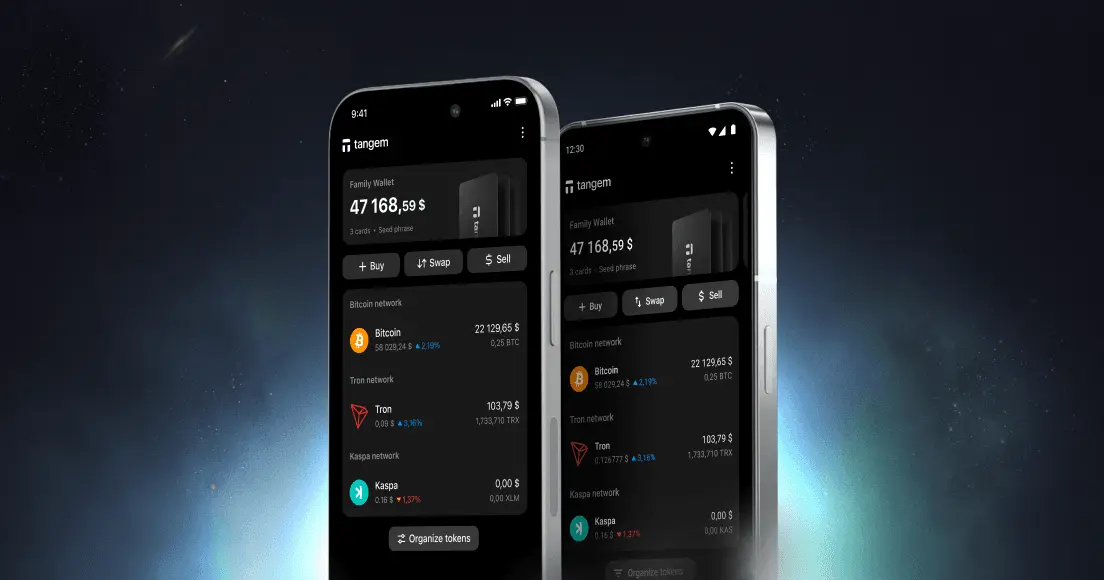
A Tangem Mobile Wallet is one of the easiest ways to get started with self-custody. Your keys stay on your device, not on an exchange, and you can send or receive in seconds. For small amounts and regular activity, that's a reasonable setup. The question is when the convenience stops being worth the exposure, and how to upgrade to a hardware wallet without losing funds or accidentally changing your addresses. Upgrade when the amount or recovery exposure would materially hurt you. To keep your addresses, upgrade in the app or import an uncompromised phrase. If the phrase may be exposed, create new keys and transfer funds.
Hot wallet vs hardware wallet: what actually changes
Both can be self-custodial. That's the starting point for any honest comparison.
| Feature | Mobile hot wallet | Hardware wallet |
|---|---|---|
| Where keys are stored | On your internet-connected device | On an isolated offline chip |
| Internet exposure | Constant | None (signs offline, broadcasts via app) |
| What an attacker needs | Access to your device or phrase | Physical device plus its access code |
| Recovery | 12-word seed phrase | Multi-card backup or seed phrase |
| Cost | Free | Paid device (e.g. $54.90 for a two-card Tangem set) |
A hot wallet maintains an active internet connection for real-time sending and receiving, which increases exposure to cyber threats. A hardware wallet generates and stores private keys on a dedicated offline chip. It signs a transaction internally and returns the signed result without ever exposing the private key to an internet-connected environment. For more on the distinction, see the hot wallet vs cold wallet overview.
When to upgrade to a hardware wallet: 6 signs it's time
There's no universal dollar threshold. The right question is: what amount could you afford to lose without it materially affecting you? When the answer becomes "not much," the calculus shifts.
Here are six concrete signals:
- Your holdings have grown beyond what you'd call spending money. Hot wallets are well-suited to daily transactions, trading, and DeFi. They're a poor fit for balances that will sit untouched for months or years.
- You're holding long-term. If you're not planning to move the funds for a while, there's no reason to keep them on a device that's online every time you open an app.
- Your recovery phrase has touched a digital surface. A phrase stored in a screenshot, a notes app, or cloud storage has already been exposed. Anyone who has it controls the funds. Moving to a hardware wallet with a fresh key set resets that exposure history.
- You've approved transactions you don't fully remember. Hot-wallet risks include phishing through fake websites or apps, malware, and dependency on the security of the device running the wallet. A hardware wallet keeps keys offline, but it doesn't prevent you from approving a bad transaction. It does, however, mean a physical tap is required for every signature.
- You're using multiple wallets across chains and losing track. A hardware wallet consolidates signing behind a physical device. That changes the attack surface significantly.
- You've seen the numbers. In 2025, individual wallet compromises reached 158,000 incidents, affecting 80,000 unique victims, with $713 million stolen (Chainalysis, December 18, 2025). Personal-wallet compromises accounted for 7.3% of stolen value in 2022 and 44% in 2024. That's a structural shift in attacker focus, not a one-off event.
Three ways to upgrade to a hardware wallet
The right path depends on whether you want to keep your existing addresses, and whether your current recovery phrase may have been exposed.
| Path | Addresses preserved | Network fees | Best for | Trade-off |
|---|---|---|---|---|
| In-app upgrade (Tangem Mobile → hardware) | Yes | None | Tangem Mobile Wallet users | Irreversible; original phrase still controls funds |
| Import existing seed phrase | Yes | None | Users migrating from MetaMask, Trust Wallet, Phantom, etc. | Phrase exposure history carries over |
| Start fresh, transfer funds | No (new addresses) | Yes, per transaction | Anyone whose phrase may be compromised | Costs gas; requires sending from every old address |
Path 1: upgrade Tangem Mobile Wallet in the app
If you're already using the Tangem Mobile Wallet, the in-app upgrade is the cleanest route. Your wallet addresses stay the same, no on-chain transfer is needed, and your balance moves to hardware control without touching the blockchain.
The upgrade is irreversible. After it completes, the mobile wallet is removed and replaced by the hardware wallet. The original recovery phrase still controls the funds, so keep it stored securely offline. Step-by-step instructions are in the next section.
Path 2: Import an existing recovery phrase
If you're coming from a different wallet, such as MetaMask or Trust Wallet, and your recovery phrase is intact and uncompromised, you can import it directly into a Tangem hardware wallet. Tangem supports 12-, 15-, 18-, 21-, and 24-word BIP39 phrases, plus an optional passphrase.
This preserves your addresses and balances. No on-chain transaction is required. The trade-off: the phrase's prior exposure history comes with it. If that phrase ever touched a phone screenshot or a cloud note, the security boundary hasn't fully changed. For a full walkthrough, see " Import a wallet with a seed phrase.
Path 3: start fresh and move your funds
Generate a brand-new key set on your Tangem hardware wallet, then send your assets from the old wallet to the new addresses. This is the cleanest security boundary: new keys, no exposure history, no phrase reuse.
The cost is network fees for each transfer. You'll also need to retain the native gas token for every network you're moving assets from (ETH for Ethereum, SOL for Solana, TRX for Tron, and so on), or you won't be able to send the tokens. Send a small test transaction first, confirm it arrives, then transfer the rest. See Move Crypto to a hardware wallet for a detailed transfer guide.
How to upgrade Tangem Mobile Wallet to a hardware wallet (step by step)
One important constraint before you start: the number of cards or rings in your backup set must be decided before setup. A private key can be backed up and cloned only once. Adding another device later requires resetting the wallet and creating a new one after moving its funds.
The steps below follow the "How to upgrade to a hardware wallet" guide.
- Open the Tangem app, tap the three-dot menu, and select your Mobile Wallet.
- Tap Upgrade to hardware wallet, then choose Upgrade current wallet.
- Authenticate with your access code or biometrics.
- If prompted, write down your recovery phrase and store it securely offline. Tap Start upgrade.
- Scan your first Tangem card or Ring.
- Tap Start upgrade again and scan the device a second time.
- Tap Add card or ring and scan your second device. Add a third if you have one, or tap Finalize backup.
- Create and confirm an access code (minimum six characters). Tap Submit, then scan all linked devices one by one to complete the setup.
The private key is now stored on your hardware device. The mobile wallet is removed from the app.
Mistakes to avoid when you move to cold storage
- Entering your recovery phrase into any website or chat. No legitimate wallet, exchange, or support team will ask for it. Once it's typed into an online field, treat it as compromised.
- Buying from unofficial sellers. Always check that your Tangem wallet is authentic using the in-app verification before setup.
- Skipping the test transaction. Send a small amount first, confirm it arrives and is spendable, then transfer the rest.
- Mismatching networks. The same token symbol on different networks (USDT on Ethereum vs. USDT on Tron, for example) is not interchangeable. The receiving wallet must support the exact network you're sending on.
- Forgetting the gas token. You need ETH to move ERC-20 tokens, SOL for Solana tokens, BNB for BNB Chain, and TRX for Tron. If you transfer everything and leave no gas, the assets are stranded.
- Leaving the old hot wallet app installed with the phrase still accessible. After upgrading, the original phrase still controls the funds. Delete or secure it intentionally.
- Not tracking your backup cards. In the default seedless setup, losing all cards with no phrase means permanent loss of access. Know where each card is.
Is a mobile wallet still useful after you upgrade?
Yes, and the most practical setup uses both. Keep a small balance in a hot wallet for daily transactions, DeFi, and anything you need to access quickly. Move the bulk of your holdings to cold storage. A hot wallet compromise affects only what you've put there, not your long-term savings.
There's one rule to know if you're using Tangem for both: a Mobile Wallet can be added alongside Tangem hardware wallets only if the Mobile Wallet was set up first. If a hardware wallet was set up first, a Mobile Wallet cannot be added later. If you upgrade your existing Mobile Wallet to hardware, the mobile wallet is removed. To keep both, create a separate hardware wallet with different private keys.
Final thoughts
The decision to upgrade to a hardware wallet comes down to one trade-off: the convenience of online access against the exposure of what you're holding. For small amounts and frequent activity, a hot wallet is practical. For anything you're holding long-term or couldn't comfortably lose, offline key storage meaningfully changes the risk profile.
If you're already on Tangem Mobile, the in-app path is the simplest route: same addresses, no fees, no transfer. Just decide your backup card count before you start, because that choice can't be changed later. If you're coming from another wallet, weigh whether importing your phrase preserves a security boundary you're comfortable with, or whether a fresh start is worth the transfer fees.
Explore Tangem card and ring sets to find the right configuration for your setup.
FAQ About Upgrading to a Hardware Wallet
-
No. The in-app upgrade from Tangem Mobile Wallet to hardware preserves your wallet addresses and moves signing control to the physical card. No on-chain transfer happens, so there are no network fees and no balance changes. Your funds stay exactly where they are.
-
Send a small amount to the new address first. Confirm that it arrives and is spendable, then transfer the rest. Make sure you keep enough of the network's native token to pay the fees for each transfer.
-
In the default seedless setup, losing all cards means permanent loss of access to the funds. There is no third-party recovery process in a self-custodial setup. This is why choosing a two- or three-card set during setup matters: each card is a full backup of the same private key.
-
Create a brand-new key set on your hardware wallet, then transfer your assets to its new addresses. Importing an exposed phrase preserves your addresses, but it also carries over that phrase's exposure history.
-
Not entirely. A hardware wallet keeps your private keys offline, so an attacker can't extract them remotely. But phishing attacks that trick you into approving a malicious transaction still work. The hardware device requires a physical tap to sign, which adds friction, but it doesn't evaluate whether the transaction you're approving is legitimate. Verify every site and contract before signing.
-
No. The backup set must be finalized during initial setup. New cards cannot be added after hardware-wallet creation is complete. If you later want to add a device, you'd need to reset the wallet, create a new one, and transfer your funds. Choose your card count carefully at the start.


Don't miss these 



Other articles

