Switch to seedless. Get 30% off with SWITCH30 till Oct 19


How to Withdraw from Binance to Tangem Wallet (Step-by-Step Guide)
This article is available in the following languages:
Core Insights
To withdraw from Binance to Tangem: (1) Open the Tangem app and copy your wallet address. (2) Select the same network on Tangem and Binance. (3) Go to Binance → Wallet → Withdraw, paste the address, then confirm the amount and network. (4) Confirm by email and 2FA. (5) Check the funds in your Tangem app. Always send a small test amount first.
Binance stopped new services for EU users on 1 July 2026. It failed to get a MiCA license and withdrew its EU application. Withdrawals remain open, so you can still withdraw your crypto. Self-custody puts you in control of your own keys.
This guide shows you how to withdraw your crypto from Binance to your Tangem wallet. It takes about 10 minutes. Follow each step in order. Send a small test amount first, every time.
Do not have a Tangem wallet yet? Get one here → Tangem Wallet. The whole process below works the moment you activate it.
Before You Start: What You'll Need
Get these four things ready before you begin.
- A Tangem wallet that is set up and activated.
- The Tangem app is installed on your phone.
- A Binance account with 2FA turned on.
- The crypto you want to withdraw is in your Binance Spot wallet.
New to self-custody? Read our self-custody guide for beginners first.
Step 1: Open Your Tangem App and Copy Your Wallet Address
Open the Tangem app on your phone. Select the coin you want to receive, for example, Bitcoin.
Tap Receive. The app shows your wallet address for that coin.
Tap Copy to copy the address. You can also show the QR code and scan it later.
Check the first four and last four characters of the address. Then check them again. Each coin has its own address. Copy the address for the exact coin you plan to send.
Step 2: Choose the Right Network
This is the most important step. The network on Binance must match the network on Tangem.
Use this table to choose the network for your coin.
Coin | Recommended network | Fee estimate | Speed |
|---|---|---|---|
BTC | Bitcoin | Medium | 10–60 min |
ETH | Ethereum, or Arbitrum, for lower fees | High on Ethereum, low on Arbitrum | 5–20 min |
USDT | TRC-20 (cheapest) or ERC-20 | Very low on TRC-20 | 2–3 min on TRC-20 |
BNB | BNB Smart Chain (BEP-20) | Low | 1–3 min |
Select the same network in the Tangem app and in Binance. For USDT, TRC-20 is the cheapest choice.
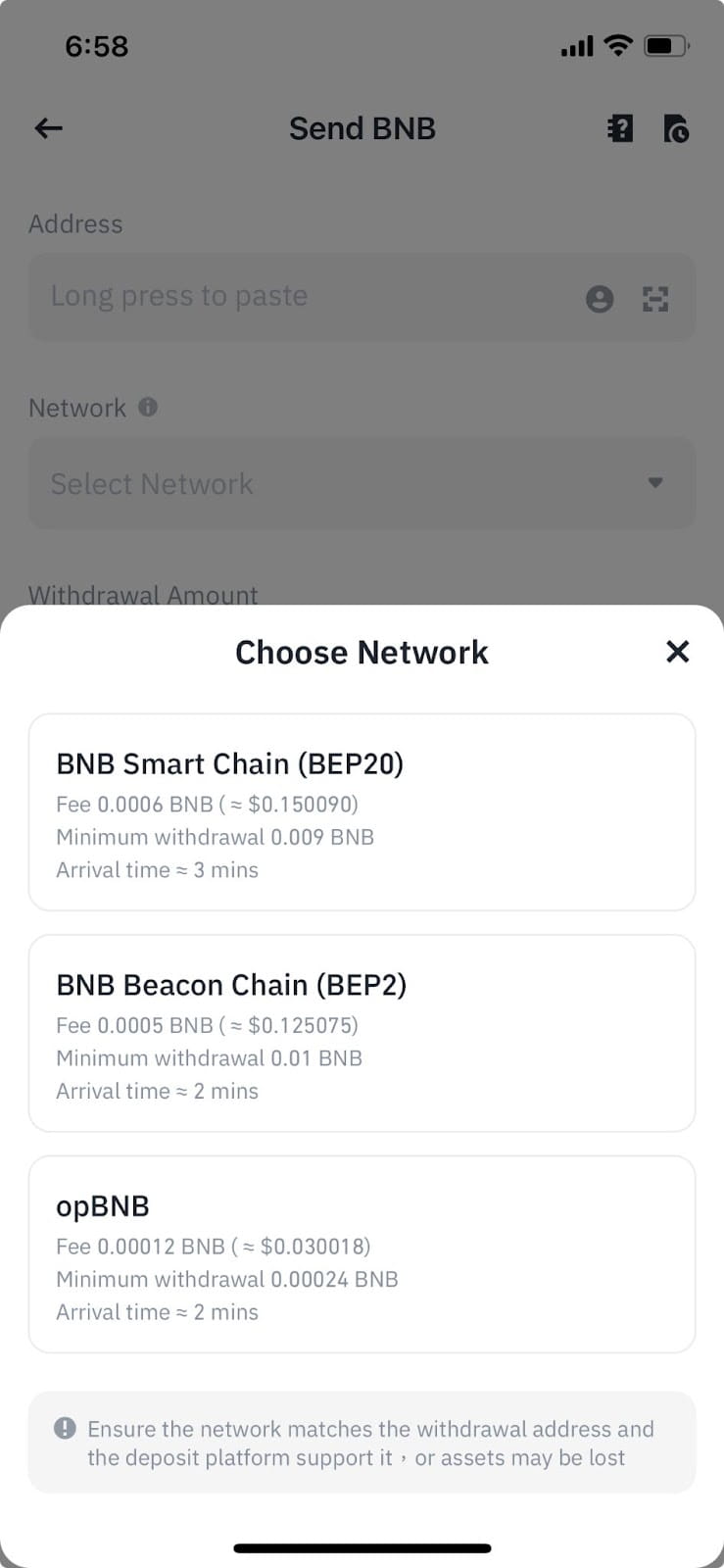
⚠️ Warning. A wrong network causes permanent loss of your funds. Make sure that Tangem and Binance use the SAME network before you send.
Step 3: Start the Withdrawal on Binance
Log in to Binance. Then follow this path.
- Go to Wallet → Spot.
- Select the coin you want to withdraw.
- Tap Withdraw, then Withdraw Crypto.
- Paste your Tangem address into the address field.
- Select the network. It must match the network from Step 2.
- Enter the amount you want to send.
- Tap Review.
- Check the address, the network, and the amount on the review screen. All three must be correct.
- Tap Continue. Your withdrawal is ready to confirm.
- Binance sends a confirmation email and asks for a 2FA code. This protects your account.
- Open the email and click the confirmation link. Enter your 2FA code when Binance prompts you.
- Binance then processes the withdrawal. The status changes to "Processing."
Step 4: Verify in Your Tangem App
Open the Tangem app and check your balance. Your funds appear after the network confirms the transaction. Confirmation times depend on the network:
- Bitcoin: 10 to 60 minutes.
- Ethereum: 5 to 20 minutes.
- USDT on TRC-20: 2 to 3 minutes.
- Solana: less than 30 seconds.
If the funds do not arrive, find the transaction hash in your Binance withdrawal history. Paste the hash into a blockchain explorer to check the status. The explorer shows if the transaction is confirmed or still pending.
Pro Tips for Safe Withdrawals
Use these five tips to withdraw safely and pay less.
- Send a small test amount first. Send a small amount, confirm it arrives, then send the rest.
- Whitelist your Tangem address on Binance. A whitelisted address speeds up future withdrawals faster.
- Withdraw during low-traffic hours. Network fees on Ethereum drop when the network is less busy.
- Leave a small dust amount. When you withdraw everything, leave a tiny amount to avoid rounding errors.
Common Withdrawal Fees from Binance
Binance charges a withdrawal fee for each coin. The fee covers the network cost.
Coin | Network | Binance fee (approx.) |
|---|---|---|
BTC | Bitcoin | 0.0005 BTC |
ETH | Ethereum | 0.0005 ETH |
USDT | TRC-20 | 1 USDT |
USDT | ERC-20 | 3.5 USDT |
SOL | Solana | 0.01 SOL |
These fees are approximate and change often. Check the current fee in the Binance app before you confirm.
Why Move from Binance to Self-Custody?
Binance holds no MiCA license in the EU or EEA. It withdrew its EU application in June 2026 and stopped new services for EU users on 1 July 2026.
Self-custody means you control your own keys. No exchange and no regulator can freeze your funds. Read more in our guide on MiCA regulation and our analysis of Binance's MiCA status.
Tangem gives you three clear advantages:
- Seedless backup. You have no seed phrase to write down or lose.
- Card format. The wallet is a card you can carry in your pocket.
- Broad support. Tangem supports 85+ blockchain networks in one app.
Need to move crypto from another exchange? Read our universal withdraw guide and the full version of this walkthrough, how to move crypto from an exchange to a hardware wallet.
Your crypto is now in your own hands. Tangem gives you full control, with no intermediaries and no regulatory risk.
FAQ
-
Yes. You send crypto to your own wallet address. You hold the keys, and no one else can access your funds.
-
You can lose your funds permanently. Always set the same network on Tangem and Binance, and send a test amount first.
-
Yes. Leave a tiny dust amount to avoid rounding errors, and pay the withdrawal fee for each coin.
-
It depends on the network. Solana takes seconds, USDT on TRC-20 takes 2 to 3 minutes, and Bitcoin takes 10 to 60 minutes.
-
Yes. Binance sets a minimum amount for each coin and network. The withdrawal screen shows the minimum before you confirm.