This article explains how network fees work when sending cryptocurrency from the Tangem wallet, detailing what each fee field means and how users can customize them.
When sending cryptocurrency from the Tangem wallet, you'll encounter a key detail: the networkfee. This is a charge required to process and confirm your transaction on the blockchain. In this article, we'll walk through how network fees work in Tangem, what each field means, and how to customize them.
What is a network fee?
As we explain directly in the app, network fees are charges that users pay to process and confirm transactions. The fee amount can be affected by network congestion, transaction size, and execution priority. In simpler terms, the busier the blockchain is, the more you may need to pay to get your transaction processed quickly.
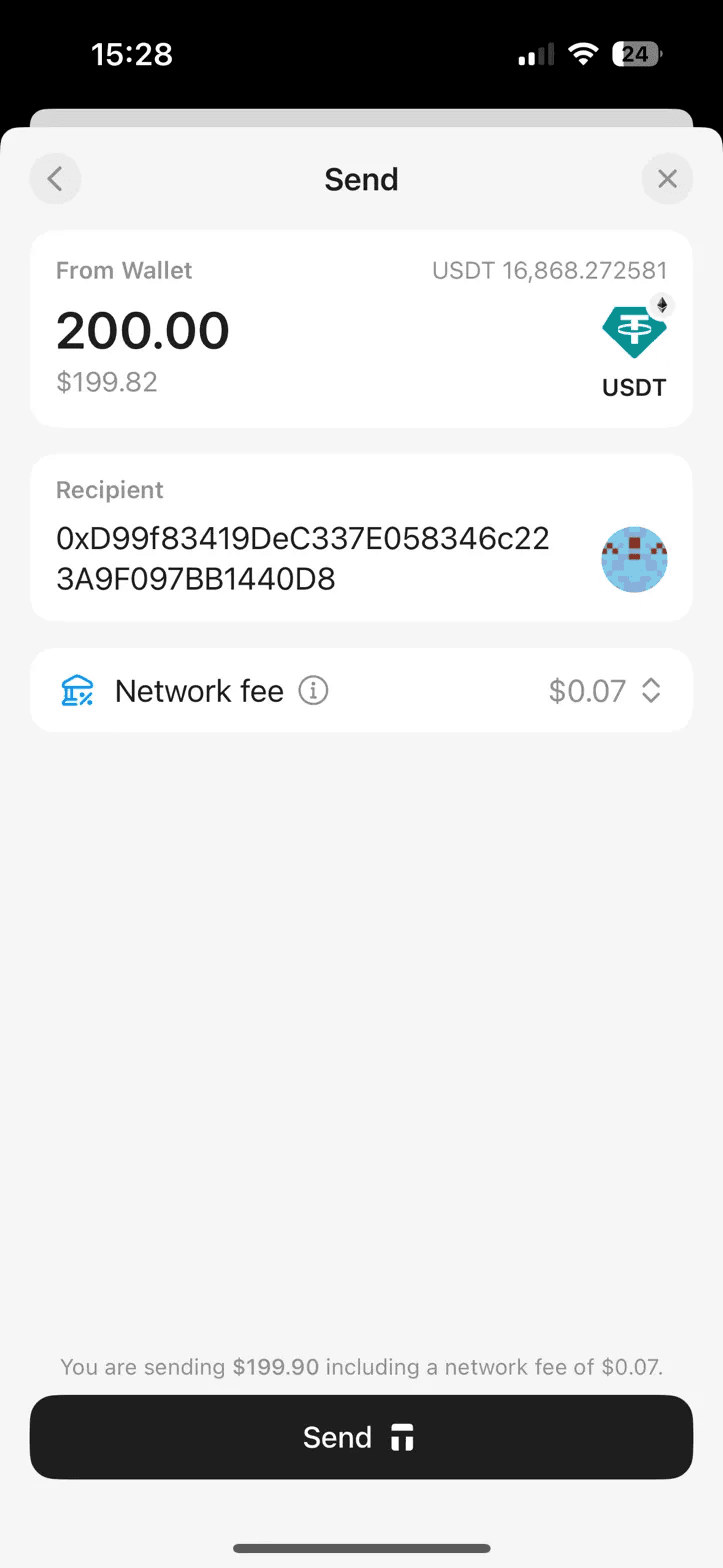
In our example, we're sending 200.00 USDT (worth approximately $199.82) to the recipient address 0xD99f83419DeC337E058346c223A9F097BB1440D8. The total cost shown at the bottom of the screen reads: "You are sending $199.90 including a network fee of $0.07."
Fee tiers
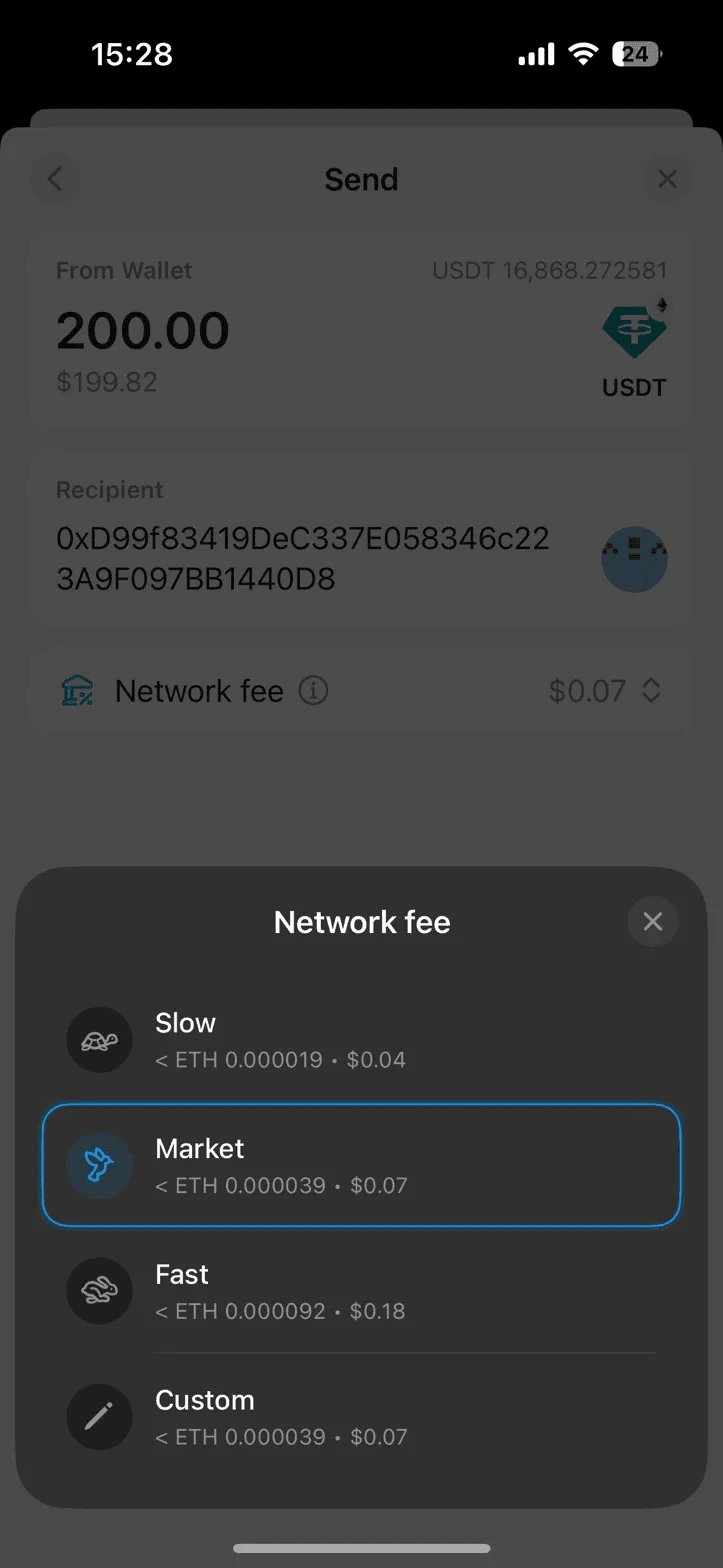
When you tap the network fee area in Tangem, a bottom sheet appears with four fee options:
Slow
This is the cheapest option, estimated at less than ETH 0.000019 (approximately $0.04). Choose this if your transaction isn't urgent and you're happy to wait longer for confirmation.
Behind the scenes, this tier sets the max fee and priority fee based on the lower end of recent block fee data. Ethereum's fee market works through an auction-like mechanism introduced with EIP-1559, where every block has a base fee; a minimum price per unit of gas that's algorithmically adjusted by the protocol depending on how full the previous blocks were.
The Slow tier typically sets the max fee close to or just above the current base fee and uses a minimal priority fee (tip), which means validators have little financial incentive to prioritize your transaction over others offering higher tips.
Your transaction will still confirm, but it may need to wait several blocks until network demand dips enough for your fee level to be competitive. This could mean confirmation in a few minutes during low-traffic periods, or potentially longer during congestion spikes.
Market
Market represents the current "going rate" on the network and is the tier most users should stick with.
Technically, this tier calculates its parameters by sampling the median or average fee levels from the most recent blocks.
Ethereum wallets (including Tangem) query the network for fee estimation data. Specifically, they use methods like eth_feeHistory or similar RPC calls that return percentile-based fee data from the last several blocks.
The Market tier typically targets somewhere around the 50th percentile, meaning roughly half of recent transactions paid less and half paid more. This gives you a high probability of being included in the next few blocks without overpaying.
For everyday transactions, sending tokens, interacting with dApps, or making routine transfers, Market strikes the best balance between cost and reliability.
Fast
For time-sensitive transactions, the Fast option costs roughly 2–4 times the Market rate.
This tier targets the upper percentiles of recent fee data (typically around the 75th–90th percentile), setting both a higher max fee and a significantly larger priority fee.
The priority fee is the key differentiator here: since validators are economically rational actors who maximize their revenue, they sort pending transactions in the mempool by priority fee from highest to lowest when assembling a new block. A higher tip effectively moves your transaction to the front of the queue.
Fast is also useful beyond just speed. During periods of rapidly rising network congestion, the base fee can increase by up to 12.5% per block (the maximum adjustment rate defined by EIP-1559). A transaction submitted with Market-level fees might become underpaid within seconds as the base fee climbs.
The Fast tier's higher max fee provides a larger buffer against base fee increases, reducing the risk that your transaction gets stuck in the mempool as conditions change.
Custom
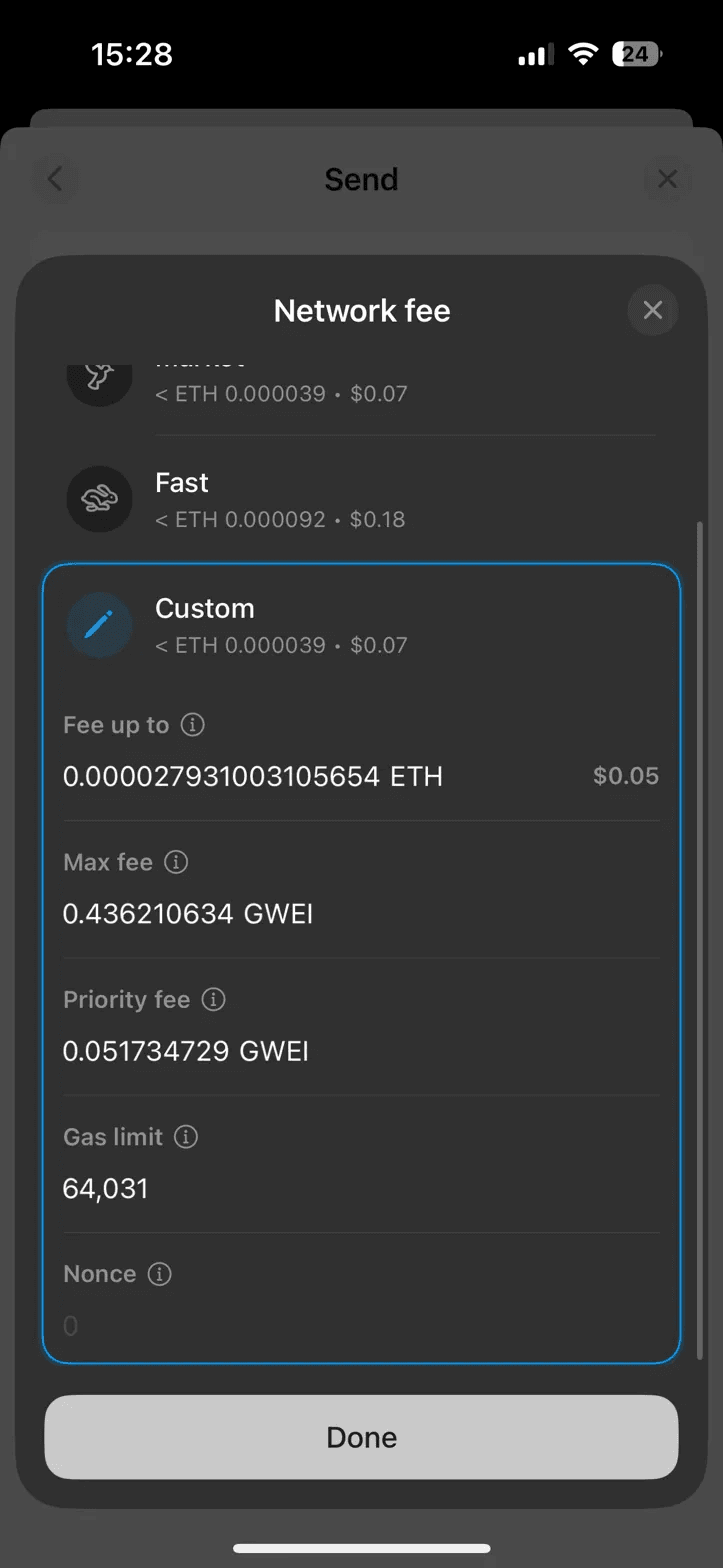
For advanced users who want full control, the Custom option opens a detailed configuration panel. By default, it mirrors the Market rate, but every parameter can be adjusted manually.
Custom fee fields explained
When you select the Custom option, Tangem reveals several advanced fields:
Fee up to
This shows the maximum total fee you're willing to pay for the transaction. In our example, it displays 0.000027931003105654 ETH (approximately $0.05). This is a calculated value based on the max fee, priority fee, and gas limit combined. Your actual fee may end up lower than this ceiling.
Max fee
This field sets the maximum price per unit of gas you're willing to pay. In the screenshot, it's set to 0.436210634 GWEI. This cap protects you from unexpectedly high costs if network congestion spikes between when you submit the transaction and when it's processed.
Priority fee
The priority fee (sometimes called the "tip") is an additional incentive paid directly to validators to prioritize your transaction. Here it's set to 0.051734729 GWEI. A higher priority fee encourages faster inclusion in the next block.
Gas limit
The gas limit defines the maximum number of computational units your transaction can consume. For this USDT transfer, it's set to 64,031. Token transfers (such as USDT, an ERC-20 token) typically require more gas than simple ETH transfers because they involve interacting with a smart contract.
If the transaction requires less gas than the limit, you're only charged for what's actually used.
Nonce
The nonce is a sequential counter that tracks how many transactions have been sent from your wallet address. In this case, it's 0, indicating this is the first transaction from this particular wallet. The nonce ensures transactions are processed in the correct order and prevents duplicate submissions.
Speeding up or replacing a stuck transaction with the nonce
One of the most practical uses of the nonce field is unsticking a pending transaction. If you submitted a transaction with a fee that's too low and it's sitting unconfirmed in the mempool, you don't have to wait indefinitely.
You can submit a new transaction using the same nonce as the stuck one, but with a higher max fee and priority fee. The network treats this as a replacement; only one transaction with a given nonce can ever be confirmed, so the new, better-funded transaction effectively overrides the old one.
For example, if your original transaction used nonce 0 with a priority fee of 0.05 GWEI and it's stuck.
Create a new transaction,
Manually set the nonce back to 0,
Increase the priority fee to a higher level (e.g., 1–2 GWEI).
Validators will prefer the higher-paying version, and once it is confirmed, the original is discarded.
This technique is sometimes called a speed-up or replace-by-fee (RBF) transaction.
Tangem's Custom fee panel makes this straightforward by exposing the nonce field directly, so you don't need external tools or a separate wallet to perform the replacement.
How it fits together
The total fee is calculated roughly as:
Total Fee = Gas Used × (Base Fee + Priority Fee)
The "Fee up to" value represents the worst-case scenario using the full gas limit and max fee. In practice, the actual cost is usually lower because not all gas is consumed, and the base fee may be less than the max fee you set.
For most users, the preset tiers (Slow, Market, or Fast) will be perfectly adequate. The Custom option is there for those who need fine-grained control, for instance, when the network is congested, and you want to precisely balance cost against confirmation speed.
Summary
Tangem makes network fees transparent and configurable for casual users who just want to pick a speed tier and power users who want to tweak every gas parameter. The wallet provides tools to manage your transaction costs effectively.
Limited-Time Offer
20% OFF + up to $20 in BTC 🛍️
Selected Wallets
Ends March 16
 + Up to $20 in BTC till Mar 16