+ Up to $20 in BTC till Apr 6
How To Store and Use a Private Key Securely

AI summary
The article emphasizes the critical importance of securely managing private keys, which are essential for controlling and accessing cryptocurrency assets. It outlines best practices for private key storage, such as using hardware wallets, avoiding digital storage, setting up secure backups, and employing strong authentication methods. The guide also covers advanced security options and the need for clear recovery plans, highlighting that robust private key management is foundational to safe crypto ownership.
As cryptocurrency exploits become increasingly common, there is a growing demand for safe, reliable ways to manage and store crypto assets. At the center of crypto security is one critical element: the private key. Protecting it from theft, hacking, and human error is essential, but it does not need to be complicated. Thanks to modern hardware wallet technology led by companies like Tangem, private key storage has become simple and accessible without sacrificing security. This guide explains what private keys are, why they matter, and best practices for securely storing and using them.
What Is a Cryptocurrency Wallet?
A cryptocurrency wallet is a software application or physical device that generates private and public keys and allows you to create, sign, and send blockchain transactions. In simple terms, it is impossible to interact with crypto assets without a wallet because it is the tool that securely manages your private key. Without secure access to a private key, you cannot prove ownership of your funds or authorize transactions.
What Are Private Keys?
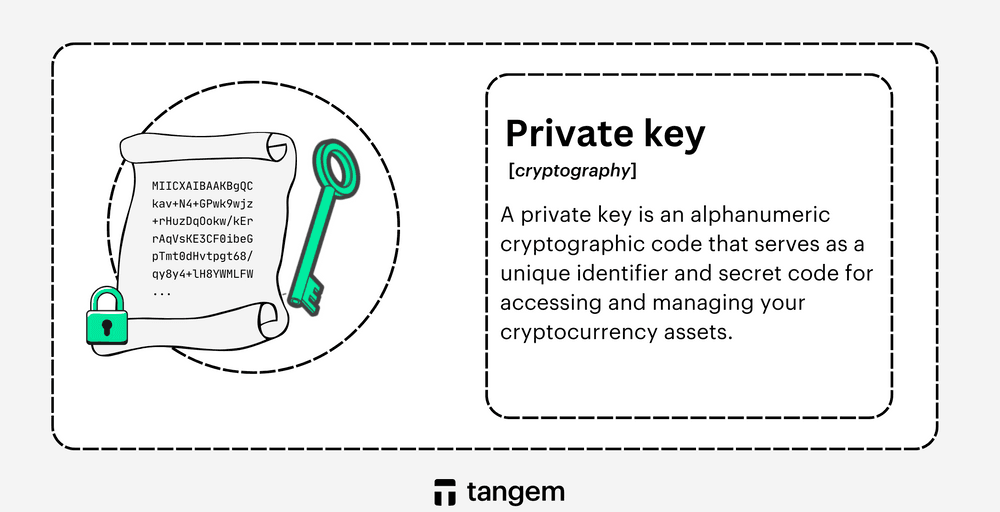
A private key is a core component of the cryptographic systems that power most cryptocurrencies. It is a long, unique alphanumeric string that gives you access to your wallet and control over your digital assets. For convenience, many wallets use a seed phrase, which is a human-readable sequence of words that serves as a backup representation of the private key. Seed phrases let you recover a wallet if you lose or damage the original device, and you must protect both private keys and seed phrases with extreme care. Anyone who gains access to them can take complete control of your funds.
Key Functions of a Private Key
- Creating digital signatures: Private keys generate cryptographic signatures that approve blockchain transactions. These signatures prove that the rightful owner of the funds authorized the transaction.
- Generating public keys: In asymmetric cryptography, algorithms such as elliptic curve cryptography use private keys to generate public keys. This one-way process lets people share public keys safely without revealing the corresponding private keys.
- Ownership and control: Control over a private key equals control over the wallet. If someone exposes or steals a private key, you can lose the associated assets irreversibly.
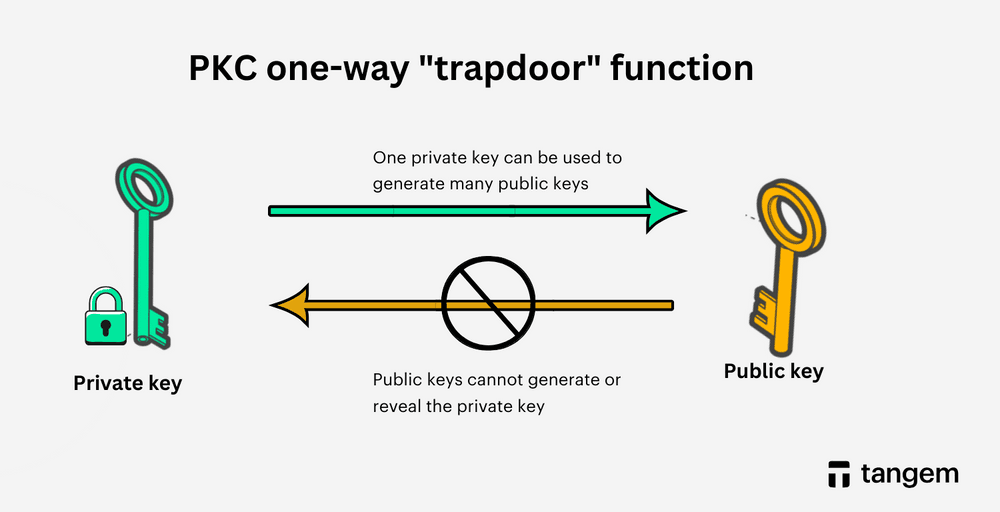
Understanding private keys is fundamental for anyone involved in crypto or Web3. Proper storage is not optional. It is the foundation of crypto security.
How to Safely Store Private Keys
Secure private key storage reduces the risk of hacks, scams, and accidental loss. Follow these best practices to protect your crypto assets.
1. Use a Hardware Wallet
A reputable hardware wallet stores private keys offline, keeping them isolated from online threats. Seedless hardware wallets like Tangem eliminate the need for recovery phrases by generating and securely storing keys on the card.
2. Avoid Digital Storage
Never store private keys in cloud storage, email drafts, screenshots, or plain text files on internet-connected devices. These are common attack vectors for hackers and malware.
3. Set Up Secure Backups
If backups are required, store them in physically secure locations such as a fireproof home safe or a safe deposit box. Avoid keeping all backups in a single location.
4. Do Not Share Your Private Key
No legitimate wallet provider, customer support agent, or service will ever ask for your private key or seed phrase. Anyone who does is attempting fraud.
5. Do Not Take Screenshots
Photo galleries and backups are often synced to the cloud and are vulnerable to unauthorized access if your device is compromised or stolen.
6. Use Strong Authentication
Protect wallet apps with strong, unique passwords and enable biometric authentication when available. These measures help prevent unauthorized access if your device is lost.
7. Enable Two-Factor Authentication
Two-factor authentication adds an extra layer of security by requiring a second verification step beyond a password, helping protect accounts even if login credentials are compromised.
8. Keep Software Updated
Regularly update wallet apps, operating systems, and security software. Updates often include patches for known vulnerabilities.
9. Avoid Public Networks
Do not access hot wallets or manage private keys using public Wi-Fi or shared devices. These environments increase the risk of interception and malware attacks.
10. Educate Yourself
Stay informed about common scams, phishing tactics, and evolving security best practices. Awareness is one of the most effective security tools.
Advanced Private Key Management Options
Multi-Signature Wallets
A multi-signature wallet requires multiple private keys to authorize a transaction. For example, a 2-of-3 multisig wallet generates three keys but requires any two to approve a transfer. This approach reduces single points of failure, and businesses, organizations, and individuals commonly use it to add extra security.
Hardware Security Modules (HSMs)
For enterprises managing large amounts of digital assets, hardware security modules provide enterprise-grade private key storage. HSMs generate, store, and use keys in a highly secure, tamper-resistant environment designed for mission-critical cryptographic operations.
Planning for Recovery and Inheritance
Document Your Recovery Process
A clear recovery plan ensures that you or a trusted person can regain access to assets in an emergency. Documentation should include recovery methods, backups, and access instructions, stored securely and shared only with trusted individuals.
Review and Update Regularly
Revisit your recovery plan at least once a year or after significant changes to your assets or security setup. Keeping it current reduces the risk of permanent loss.
Specialized Security Features in Hardware Wallets
FIDO2 Hardware Authentication
FIDO2 replaces passwords with hardware-based authentication. A physical device holds a private key and signs authentication challenges, protecting users from phishing and credential theft.
Trusted Platform Modules (TPMs)
TPMs are dedicated chips that generate and store cryptographic keys in a secure environment. They protect against data theft, unauthorized access, and tampering, and are a key component in modern secure hardware. These technologies significantly strengthen hardware wallet security by keeping private keys isolated and unextractable.
Conclusion
Secure private key management is the foundation of crypto ownership. While paper wallets and traditional hardware wallets offer strong protection, seedless hardware wallets like Tangem raise the bar by eliminating recovery phrases and keeping keys permanently offline. Tangem Wallet combines robust security with everyday usability, giving users confidence and control without complexity. When it comes to private keys, there is no room for compromise.
FAQs about Using the Private Key
How can I securely store a private key?
The safest option is a cold hardware wallet that stores private keys offline. Combine this with strong authentication, secure backups, and cautious online behavior.
Can private keys be safely stored in databases?
No. Storing private keys in databases exposes them to breaches and unauthorized access. Experts strongly recommend offline storage methods.
Where should private key certificates be kept?
Store private key certificates in cold storage environments, such as hardware wallets or secure physical backups, and protect them from unauthorized access.
How can private keys be safely stored on Linux?
Use a hardware wallet or an encrypted file with strict access controls. Keep systems up to date, avoid public networks, and maintain secure backups.