+ Up to $20 in BTC till Mar 26
How to Use Polymarket on Your Cold Wallet And Keep Your Funds Actually Safe
- AI summary
- What Is Polymarket?
- Hot Wallet vs. Cold Wallet: What's the Difference?
- Why You Should Use a Cold Wallet for Polymarket
- Understanding What Polymarket Actually Needs From Your Wallet
- What You Need Before You Start
- Why Tangem Is the Best Cold Wallet for Polymarket
- Step-by-Step: Setting Up Tangem for Polymarket
- How to Check Your Positions and Cash Out
- Bridging and Gas Fees: A Closer Look
- Security Tips for Polymarket Users
- Frequently asked questions
- References
- Final Thoughts
AI summary
This article explains why using a cold wallet, specifically the Tangem card, is the safest and most convenient way to interact with Polymarket, a blockchain-based prediction market. It details the security risks of hot wallets, outlines the simple setup process for Tangem, and provides step-by-step instructions for funding, connecting, and using the wallet with Polymarket. By using Tangem, users gain enhanced protection against hacks and phishing, while enjoying an easy, mobile-friendly experience without the need for seed phrases or complex hardware.
So you've heard about Polymarket, maybe you've already placed a few predictions, and now you're wondering: "Should I really be keeping my crypto on a hot wallet for this?" That's a smart question. The short answer is no, you probably shouldn't. This guide will walk you through exactly how to connect Polymarket to a cold wallet, why it matters, and why Tangem is the easiest way to do it without a headache.
What Is Polymarket?
Polymarket is a prediction market platform built on the Polygon blockchain. You bet real money (in USDC) on whether real-world events will occur. Will this candidate win the election? Will this country hit a certain inflation number? Will a specific product launch before a deadline?
If you're right, you make money. If you're wrong, you lose it—simple concept, pretty exciting in practice. Because Polymarket is a decentralized app (dApp), it talks directly to your crypto wallet. There's no "Polymarket account" in the traditional sense. Your wallet is your account. This means whoever controls your wallet controls your money on Polymarket, which is precisely why your wallet choice matters a lot.
Hot Wallet vs. Cold Wallet: What's the Difference?
Before we go any further, let's clarify these two terms, as they come up frequently.
A hot wallet is a wallet that's connected to the internet. MetaMask, Coinbase Wallet, and Trust Wallet are examples. They're convenient and great for quick transactions, but they're always online, which means they're constantly exposed to potential hacks, phishing, and malware.
A cold wallet (also called a hardware wallet) keeps your private keys offline. The private key is the master password to your crypto. If someone gets it, they own your funds. With a cold wallet, your private key never touches the internet. It lives on a physical device, and you physically approve every transaction by tapping or pressing a button on the device itself.
Think of it this way: a hot wallet is like keeping cash in your pocket. A cold wallet is like keeping it in a small safe you carry with you. Both are accessible, but one is much harder to steal from. You can read more about how this works in Tangem's breakdown of hot wallets vs. cold wallets.
Why You Should Use a Cold Wallet for Polymarket
Polymarket deals in USDC, a dollar-pegged stablecoin. People have had thousands of dollars on the platform during big election cycles and significant world events. That's real money sitting in a wallet, often for weeks or months while you wait for an event to resolve.
Here's the problem with leaving that money in a hot wallet:
- Phishing attacks are common in the crypto space. You might get a fake email or visit a spoofed website, connect your wallet, and unknowingly sign a malicious transaction that drains your funds.
Malware on your computer can read browser extension wallets. There have been documented cases of MetaMask seed phrases being stolen by keyloggers.
Human error is also a factor. If you lose your phone or laptop and someone finds it, a hot wallet with a weak password is not a great deterrent. With a cold wallet, your private key never leaves the physical device. Even if someone hacks your computer, there's nothing to steal. You still have to approve every transaction on the hardware device physically. That physical confirmation step is what makes cold wallets so much safer.
Understanding What Polymarket Actually Needs From Your Wallet
Polymarket runs on the Polygon network (also called MATIC or POL). This is a Layer 2 blockchain built on top of Ethereum. It's fast and cheap to use, which is why Polymarket chose it.
When you use Polymarket, your wallet needs to:
- Sign messages to prove your identity (this doesn't cost gas)
- Approve USDC spending (a one-time transaction that costs a tiny bit of MATIC for gas)
- Execute trades (each prediction you enter or exit is a transaction on Polygon)
So you'll need two things in your wallet:
- USDC on Polygon (this is what you bet with)
- A small amount of MATIC/POL (to pay for gas fees, usually a few cents per transaction)
If you're coming from Ethereum or another chain, you'll need to bridge your USDC to Polygon first. More on that below.
What You Need Before You Start
- A Tangem wallet card
- The Tangem app on your phone (iOS or Android)
- USDC on the Polygon network
- A small amount of MATIC/POL for gas (usually $1-2 worth is plenty)
- A browser on your computer (Chrome or Brave works well)
- MetaMask or a WalletConnect-compatible interface to bridge the connection between Tangem and Polymarket
Why Tangem Is the Best Cold Wallet for Polymarket
Most people think of hardware wallets as bulky USB devices you plug into your computer. Hardware wallets like Ledger or Trezor work, but they're clunky. You need to install apps, update firmware, remember which apps support which coins, and carry a separate device.
Tangem is different. It's a cold wallet in the form of a credit card-sized NFC card. Your private key is generated on the card itself and never leaves it. You tap the card to your phone to approve transactions. That's it.
Here's why Tangem works explicitly well for Polymarket:
No seed phrase by default. With most wallets, you write down 12 or 24 words (your seed phrase), and if you lose them, you lose everything. Tangem uses a 3-card backup system instead, which is safer and simpler. You can learn more about how this works in Tangem's guide to setting up Tangem without a seed phrase.
- WalletConnect support: Tangem connects to dApps like Polymarket through WalletConnect, the standard protocol for linking hardware wallets to web apps. It works smoothly.
- Polygon support: Tangem fully supports the Polygon network so that you can hold USDC and MATIC right on your card.
- Your phone is your interface. You don't need a computer at all. Open the Tangem app, tap your card, and you're in. This simplicity is huge when you're trying to interact with a dApp on the go.
- No battery, no charging. The card is powered by your phone's NFC reader when you tap it. Nothing to charge, nothing to break.
For someone who wants absolute hardware wallet security without the complexity, Tangem is genuinely hard to beat. Check out why Immutable firmware is the safest choice for your crypto.
Step-by-Step: Setting Up Tangem for Polymarket
Step 1: Set Up Your Tangem Wallet
If you haven't set one up yet, it takes about 2–3 minutes.
- Download the Tangem app (iOS or Android)
- Open the app and tap "Start."
- Hold your Tangem card to the back of your phone
- The app will detect the card and walk you through setup
- Set a PIN or biometric lock
- Set up your backup cards if you have them (highly recommended)
Done. You now have a cold wallet. Your private key is now generated on the card itself and can never be exposed to the internet.
Step 2: Add the Polygon Network and Enable USDC
In the Tangem app:
- Go to your wallet home screen
- Tap on the 3 dots at the top right of your screen
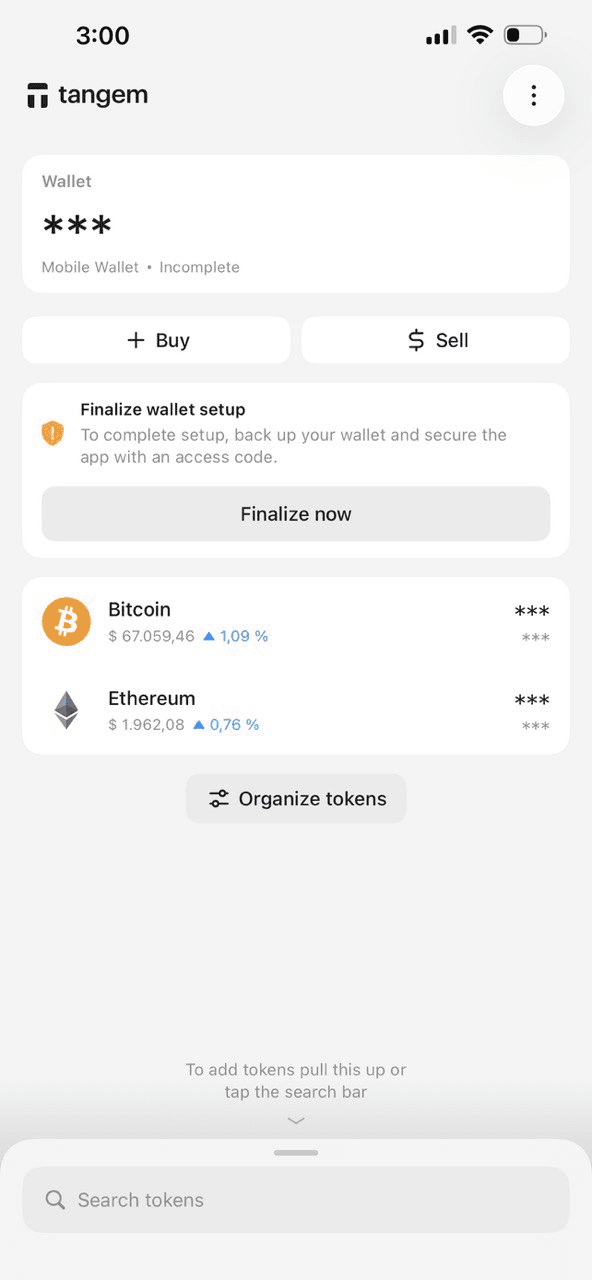
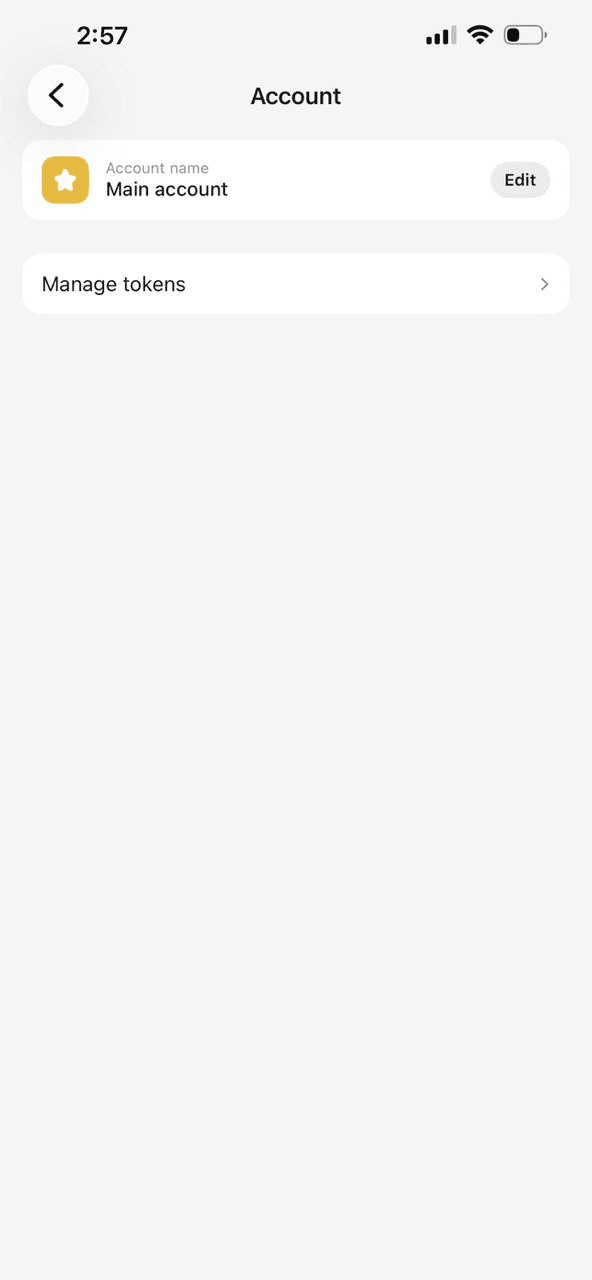
- Select your existing wallet, then click on “Account”
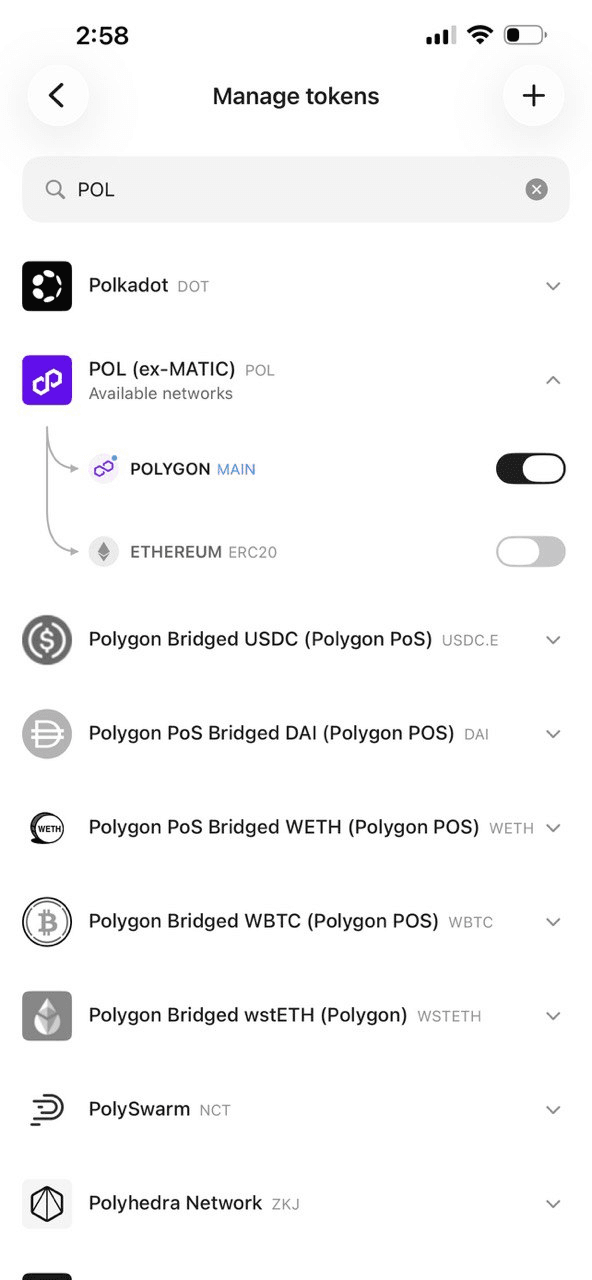
- Tap "Manage tokens"
- Search for “POL (ex-MATIC)” and add it to your wallet.
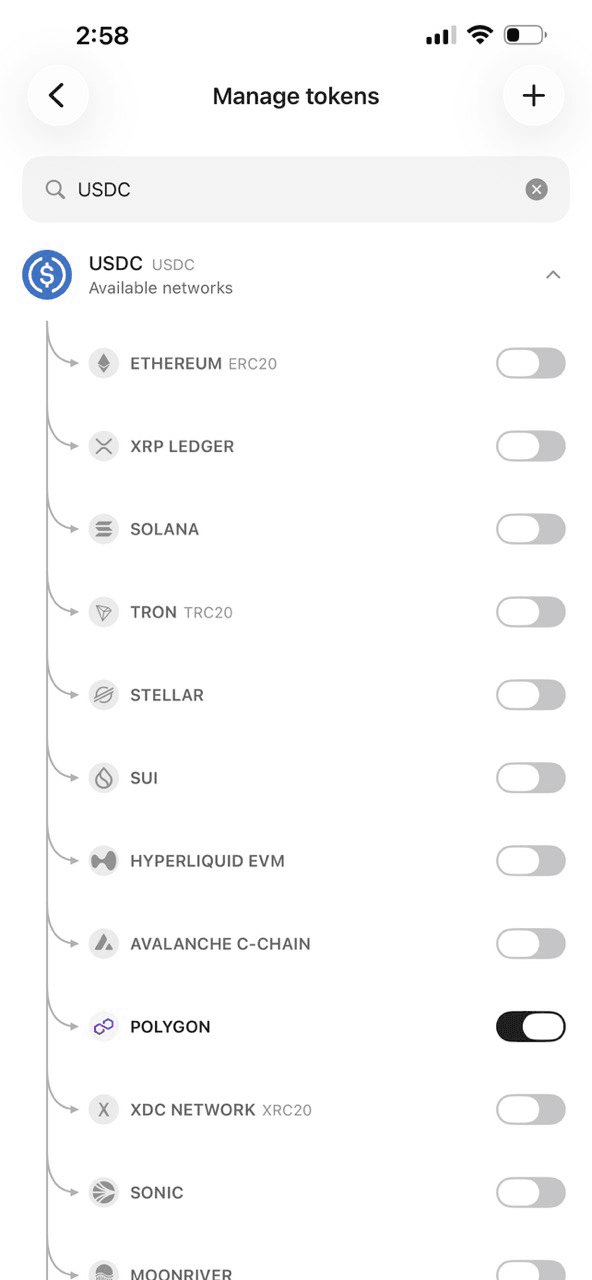
- Also search for "USDC" and select the one on the Polygon network (not Ethereum)
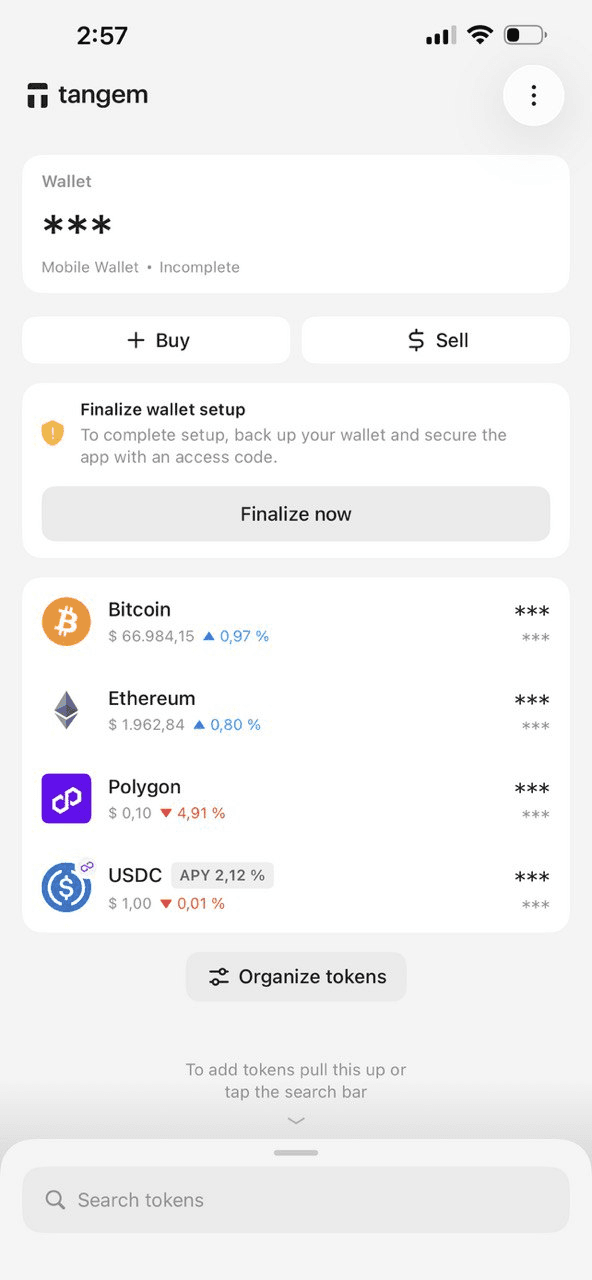
You should now see both USDC (Polygon) and MATIC listed in your wallet.
Step 3: Fund Your Wallet With USDC on Polygon
You need USDC on the Polygon network specifically. There are a few ways to get it:
Option A: Buy directly. Some exchanges let you withdraw USDC directly to the Polygon network. Coinbase and Kraken both support this. When withdrawing, select "Polygon" as the network. Paste your Tangem wallet address (find it in the Tangem app under your USDC token).
Option B: Bridge from Ethereum. If you already have USDC on the Ethereum mainnet, you can use the Polygon Bridge to transfer it to Polygon. Connect to MetaMask for this step, send your USDC, then transfer it to your Tangem wallet address.
Option C: Use an in-app swap. Tangem has a built-in swap feature. You can swap another coin for USDC on Polygon directly inside the app.
Also, make sure you have a small amount of MATIC in your Tangem wallet for gas. A dollar or two is usually enough for many transactions.
Step 4: Connect Tangem to Polymarket via WalletConnect
This is where everything comes together.
- Open your browser and go to polymarket.com
- Click "Connect Wallet" in the top right corner
- You'll see a list of wallet options. Choose WalletConnect
- A QR code will appear on your screen
- Open the Tangem app on your phone
- Tap the WalletConnect icon (it looks like a circle with two lines)
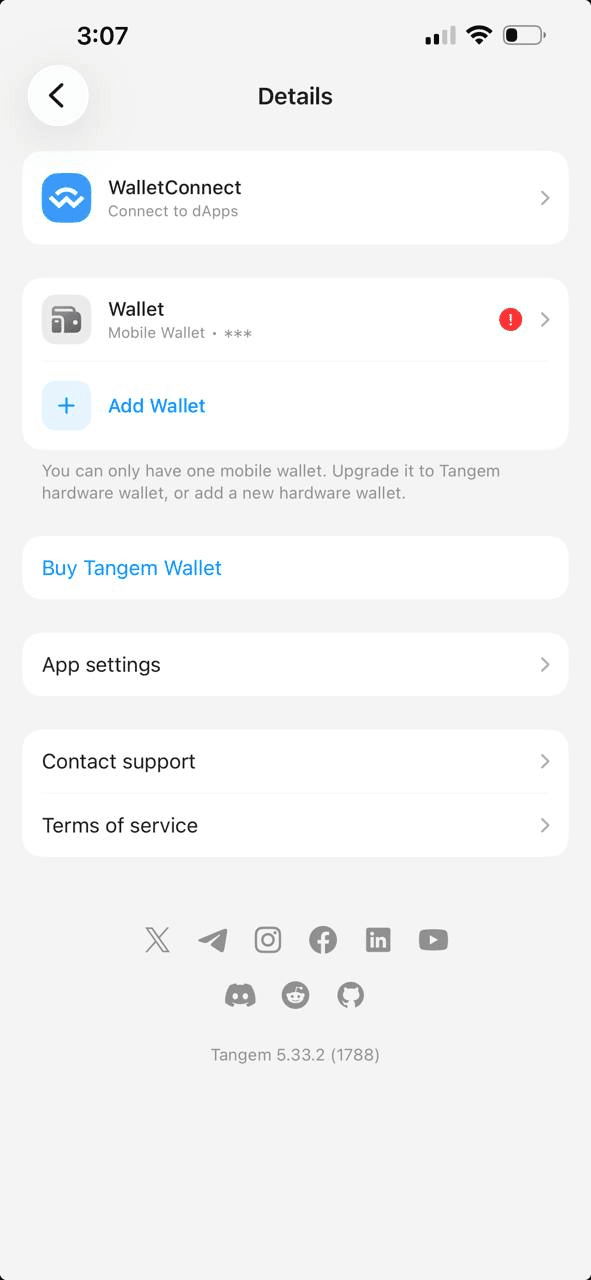
- Tap “New connection” and scan the QR code shown on the Polymarket website
- Tap "Connect" in the Tangem app
- Your Tangem wallet address is now connected to Polymarket
You should see your wallet address in the top-right corner of the Polymarket site. If it shows your USDC balance, you're fully set up.
Step 5: Approve USDC Spending (One-Time Setup)
The first time you try to place a prediction, Polymarket will ask you to approve it to spend your USDC. This is a smart contract approval, which is standard in DeFi.
- Try entering a prediction market on Polymarket
- When prompted, click "Approve USDC"
- Your Tangem app will show a transaction request on your phone
- Review the details and tap your card to your phone to approve
- The transaction goes through in a few seconds on Polygon
This approval incurs a small MATIC gas fee. After this, you don't need to approve again unless you revoke the permission.
Step 6: Place Your First Prediction
Now the fun part.
- Browse markets on Polymarket.
- Find an event you want to predict
- Choose "Yes" or "No" (or whichever outcome you think will happen)
- Enter the amount of USDC you wish to bet
- Click "Confirm"
- The Tangem app will prompt you to approve the transaction
- Tap your card to your phone
- Done. Your prediction is live.
Every time you enter or exit a position, you'll tap your card to approve. It takes about two seconds. That tap is your physical confirmation that you, in person, with the actual card in your hand, approved this transaction. No hacker sitting in another country can do that for you.
How to Check Your Positions and Cash Out
To see your active predictions, just visit Polymarket while connected. Your portfolio tab shows everything you've bet on, along with the current probability of each outcome.
When an event resolves (for example, the election happens and a winner is declared), Polymarket settles the market. If you predicted correctly, your USDC winnings are deposited back into your connected wallet, which is your Tangem card.
To cash out:
- On Polymarket, your winnings show up as claimable
- Click "Claim" and approve the transaction in Tangem (tap your card)
- Your USDC is now back in your Tangem wallet
- From there, you can send it to an exchange to convert to cash or hold it
Bridging and Gas Fees: A Closer Look
One thing that trips people up is the Polygon gas fee situation. Here's a simple breakdown. Polygon uses MATIC (formerly POL) as its gas token. Every transaction on Polygon, including Polymarket trades, requires a small amount of MATIC. We're talking fractions of a cent to a few cents, depending on network activity.
If you run out of MATIC, your transactions will fail. It's annoying. The fix is simple: always keep a little MATIC in your Tangem wallet. Like, $2 worth of MATIC will cover hundreds of Polymarket transactions.
To get MATIC on Polygon:
- Buy MATIC on an exchange and withdraw to the Polygon network
- Or use Tangem's built-in swap to exchange a bit of your USDC for MATIC
For a deeper dive into how gas works across different networks, check out Tangem's introduction of smart gas and payment of network fees with stablecoins.
Security Tips for Polymarket Users
Using a cold wallet is already a massive security upgrade. But here are a few more things worth knowing:
- Only connect to the real Polymarket site: polymarket.com. Bookmark it. Don't click links from random Discord or Telegram groups. Fake Polymarket sites exist, and they'll drain your wallet if you connect to them. Your Tangem will still prompt you to sign transactions, but a fake site might trick you into approving a malicious transaction.
- Review every transaction before tapping. The Tangem app shows you what you're approving. Amount, recipient address, contract being called. Take a second to look at it before tapping your card.
- Revoke unused permissions. If you stop using Polymarket for a while, consider revoking its USDC approval. You can do this through Revoke. cash, a free tool that lets you manage smart contract permissions. Connect with WalletConnect, find Polymarket's approval, and revoke it. Re-approve when you come back.
- Keep your backup cards safe. Tangem's backup system is your safety net. Store your backup cards in different physical locations, such as one at home and another at a trusted location.
- Don't share your Tangem card or PIN with anyone. This is obvious, but worth saying.
Frequently asked questions
Can I use Tangem with Polymarket on mobile?
Yes. Polymarket has a mobile-friendly website. Open it in your phone's browser, connect via WalletConnect, and approve transactions by tapping your Tangem card to the back of your phone. The whole thing works on mobile without needing a computer.
What if I lose my Tangem card?
If you set up backup cards (which Tangem strongly recommends), you can use one of them to access your wallet. If you only had one card and lost it without setting up a backup, your funds could be unrecoverable. This is why the 3-card backup system exists. Read more about it in Tangem's backup guide.
Do I need to use WalletConnect every time I visit Polymarket?
The connection usually persists in your browser. When you return to Polymarket, it may auto-reconnect; if it doesn't, just go through the WalletConnect QR code process again. It takes about 30 seconds.
Is Polymarket legal where I live?
Polymarket is not available to US residents due to regulatory reasons. It's accessible in most other countries, but the rules vary. Check your local laws. This article doesn't constitute legal advice.
What's the minimum amount I can bet on Polymarket?
It varies by market, but it's usually around $1 USDC. Some markets have higher minimums.
Can Polymarket access my wallet and withdraw my funds without my approval?
No. The USDC approval you gave Polymarket only allows it to move funds when you explicitly initiate a trade. Every trade is a separate transaction that requires your signature (your card tap). Polymarket cannot unilaterally pull funds from your wallet.
What's the difference between Polygon USDC and Ethereum USDC?
They're both USDC, but they live on different blockchains. Polymarket only accepts USDC on the Polygon network. If you send Ethereum or USDC to a Polygon address by mistake, with Tangem, you actually own both addresses (your Ethereum and Polygon addresses are different), so you'd see it in your Ethereum wallet. But you'd need to bridge it to Polygon before Polymarket can use it.
Why is Tangem better than Ledger for this use case?
Ledger requires you to install a Polygon app on the device, update firmware regularly, and plug it into a computer. Tangem works wirelessly with your phone, requires no apps or firmware updates, and takes just minutes to set up, not an hour. For a simple use case like Polymarket, Tangem's simplicity is a genuine advantage. Both are secure, but Tangem removes most of the friction.
Can I use multiple wallets on Polymarket?
Technically yes. Your Polymarket "account" is tied to your wallet address. If you connect a different wallet, you'll see a different portfolio. Some people use multiple wallets for other purposes, but one Tangem wallet should be more than enough for most users.
What happens to my Polymarket positions if I lose internet access?
Your positions are on-chain. They don't disappear. When you reconnect, everything is precisely where you left it. The blockchain doesn't care about your WiFi.
References
- Polymarket Official Site and Docs - polymarket.com and their official blog for market updates and platform news
- Polygon Network Documentation - docs.polygon.technology - Technical documentation for the blockchain Polymarket runs on
- USDC Official Site - circle.com/usdc - Circle issues USDC; their site explains how the stablecoin works
- WalletConnect Docs - docs.walletconnect.com - The protocol that lets your Tangem wallet talk to Polymarket
- Revoke.cash - revoke.cash - Free tool to manage and revoke smart contract approvals
- Ethereum Foundation on Private Keys - ethereum.org/en/wallets - Great explainer on how crypto wallets and keys work, written for beginners
- CoinGecko on MATIC/POL - coingecko.com - Track MATIC price and learn about the Polygon ecosystem
- Dune Analytics - Polymarket Data - dune.com - On-chain data dashboards including Polymarket volume and user activity
- CFTC on Prediction Markets - cftc.gov - For understanding the US regulatory perspective on prediction markets
Final Thoughts
Prediction markets are genuinely intriguing. They put your money where your mouth is on real-world events, and they can be surprisingly profitable if you do your research. But the one thing that ruins the experience faster than a wrong prediction is losing your funds to a hack or phishing attack.
Using a cold wallet like Tangem solves that problem in the most painless way possible. Tap your card, approve your transactions, pocket your winnings: no seed phrase to write down, no USB device to carry around, no complex setup. If you're serious about using Polymarket beyond casual curiosity, set up a Tangem wallet first. The few minutes it takes will save you a lot of grief later. Your keys, your crypto. That's the whole point.

Don't miss these